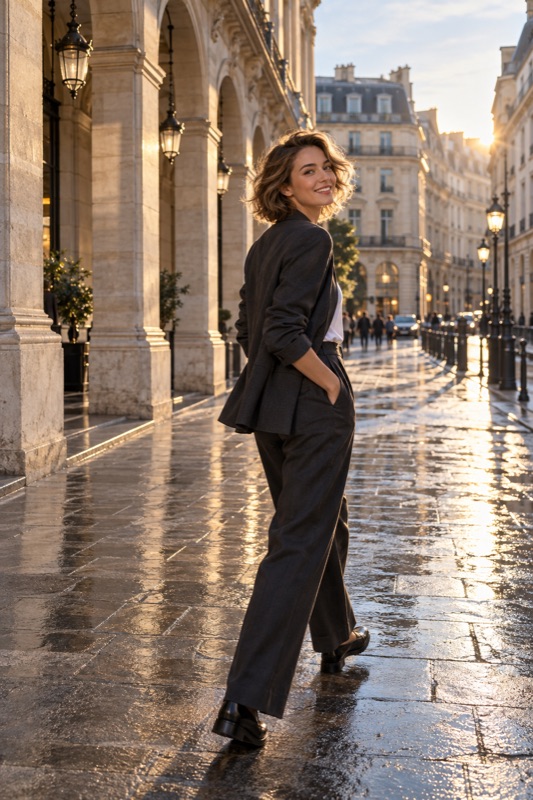
Choose a comfortable position, give your hands a small job, and make one gentle movement between frames. Start with a standing turn, a relaxed seated pose, or a slow step. Review how you feel in the picture instead of forcing a pose that does not suit you.
Get it on Google PlayYou do not need a different body or a practiced expression
A natural portrait begins with a manageable task. Being told to look confident or act candid can make you more aware of the camera. A concrete action, such as looking toward a window or loosely holding a jacket, is easier to try and easier to change.
Illustrative scenario: you want one nice picture of an outfit before meeting friends. Instead of scrolling through twenty elaborate poses, choose a clear wall, one comfortable stance, and three variations. The session has a finish line. None of the examples below is a rule about how women should stand or what a body should look like; keep the positions that feel like you.
Three standing variations to try
Begin with both feet supported and your shoulders relaxed. Turn a little toward one side, then bring your gaze back toward the camera if that feels comfortable. Let your arms rest naturally; a small space between an arm and your torso may make the outline easier to read, but it is optional.
For a second version, shift your weight gently and place one foot a little forward. For a third, look away toward something in the scene. Keep the framing similar so you can judge which expression and stance you like. There is no need to tilt every joint or hold your breath.
- Stand comfortably and let your shoulders settle.
- Turn slightly and take one picture looking toward the camera.
- Change only your gaze for the next picture.
- Try a small weight shift, then relax and review.
Give your hands a reason to be there
Try holding a bag strap, resting a hand on a table, lightly touching a sleeve, or carrying a cup. Keep the grip loose. If the prop hides something you want to show, move it rather than forcing the rest of your body around it.
Avoid giving both hands complicated instructions at once. Start with one hand doing something and let the other rest. Check a saved frame for clipped fingers or a prop directly in front of the face. A small repositioning is often more useful than starting the whole pose again.
| Situation | A simple action | What to check |
|---|---|---|
| Café portrait | Rest a hand near a cup | The cup does not hide your face |
| Outfit photo | Lightly hold a bag strap | Clothing details remain visible |
| Travel scene | Look toward the view | Your face is still readable if that is the goal |
| Seated portrait | Rest hands on a lap or table | Shoulders feel relaxed rather than lifted |
Seated and walking photos without the performance
When sitting, choose a secure, comfortable surface. Turn a little toward the light and move away from the chair back only if it feels natural. Ask the photographer to adjust their height so the table edge and your hands sit where you want in the frame. Comfort matters more than a prescribed angle.
For a walking picture, take one or two slow steps, pause, and look toward your companion. In dim light, a paused step may look more natural and stay sharper than continuous walking. If your hair or clothes are moving, inspect the saved picture rather than assuming a sharp preview means a sharp capture.
Take a solo portrait with a supported camera timer
Place your phone in a secure holder or on a stable surface, frame a little wider than you need, and mark a position for yourself. Use your phone's native camera timer if it offers one. Google, for example, documents 3-second and 10-second selfie timers in Pixel Camera. This is a native-camera example, not a claim that ShotCoach provides those timers.
Test with an object at approximately your intended position, then take one photo and check the focus, crop, and light after you step into place. Face detection and focus behavior vary, so do not assume the initial test object guarantees your face will be sharp. Make a small set, review it, and adjust the phone before trying a new pose.
Keep the support stable and the phone within reach. Pick a location where you have room to pause without blocking a path. For a rear-camera self-portrait, a slightly wider composition gives you more room to settle into the frame; crop after checking the picture.
Let the camera help with the part you cannot see
When a friend is photographing you, show them one pose you feel comfortable trying and agree on the crop. ShotCoach AI can help the person holding the phone work on framing and supported camera settings. Its guidance does not replace your choice of expression or the decision to stop and try something else.
Choose your favorite picture by asking whether it feels like you, whether the important details are visible, and whether the moment is worth keeping. Save one useful reference for next time. You are building a small personal repertoire, not memorizing a hundred poses.
Before your next photo walk
What should I do if every pose feels awkward?
Take a short break, then try one ordinary action such as sitting comfortably or looking toward a window. Keep the camera setup simple and review a few pictures before adding more instructions.
Can I take good pictures of myself without a photographer?
Yes, a stable phone support and a supported native-camera timer let you experiment alone. Make a test picture, check the saved focus and crop, and keep the phone securely positioned.
Should I always smile at the camera?
No. Try a relaxed expression, a glance toward the scene, or a smile if you feel like it. The best choice is the one that matches the picture you want.
ShotCoach AI
Have a friend behind the camera? Give them a little direction with ShotCoach AI.
Get it on Google PlayAvailable for Android · AI guidance is paid